Outside-buyer checks for B2B SaaS

See where buyers get stuck in your demo and sales flows.

BookedDemo checks your forms and calendars as an outside buyer. See what each approved buyer profile got, and keep checking as your site changes.

Example data · Approved Full proof

  • US CommercialMeeting booked
  • Germany EnterpriseNo appointments

From $49 a month for one Path. Daily Safe checks stop before submitting. Nothing to install, no CRM access.

A Path is one public route to a demo, contact-sales, quote, or trial request.

Demo request /demo

orbit-analytics.example · Approved Full proof · example data

Broken

Same route. Two different outcomes.

US Commercial · US network · desktop

Head of Growth · 250–999 employees

  1. Form reached
  2. Submit observed
  3. Meeting booked

Germany Enterprise · Germany network · desktop

Revenue Operations Manager · 1,000+ employees

  1. Form reached
  2. Submit observed
  3. No appointments

An approved Full-proof cycle. Approved after-submit checks are available on Verify and Scale; Monitor’s daily checks stop before submit.

Teams usually come looking after one of these. The work sits with RevOps, Marketing Ops, Demand Gen, Growth, or whoever owns the website.

  • A release or migration touched the form, scheduler, or routing.
  • A new campaign landing or territory went live.
  • Requests or meetings dipped in one region, segment, or device.
  • Sales says the leads are not arriving.
  • A buyer said they never heard back.
  • A fix shipped and nobody has proven it held.

57%

of the 53 sales-route failures we reproduced showed no HTTP error. The page loaded. The buyer still couldn’t reach sales.

Buttons that went nowhere. Booking pages that loaded normally but said the meeting page was unavailable. The rest were ordinary 404s.

See the research →

Illustrative Worked examples. We did not measure how often each happens.

A Path can still work and get worse.

  • The enterprise buyer gets a different form

    Form · buyer profile

    Commercial buyer
    2 steps · 6 required questions
    Enterprise buyer
    3 steps · 8 required questions
  • One timezone gets no times in its working day

    Scheduler · timezone

    Buyer in CET
    Times at 10:30 and 13:30
    Buyer in US Eastern
    Only 4:30 and 7:30 in the morning
  • The calendar takes 18 seconds to appear

    Handoff · wait

    Page with the button
    Loads right away
    Meeting times
    Usable after 18 seconds
  • The German landing hands over in English

    Landing · language

    Campaign landing
    German
    Page behind the CTA
    English

All four can pass your tests and hide in your totals. We keep the friction and what changed, not only what breaks. See it in the sample report →

How it works

We set it up. You confirm what matters.

  1. We propose buyer contexts that can branch differently

    Give us a domain. We find the important Paths and the buyers who may see something different: another region, role, company size, industry, language, or device. You confirm or correct them.

  2. We run the Path as that buyer

    Where the form asks, we answer with that buyer’s details and follow the branch they get: CTA, form, scheduler, submit where you approve it, and what arrives afterward.

  3. Act on the finding, then verify

    You get the affected context, the evidence, and the next check to make.

How far we can follow a buyer depends on the Path. A demo request often reaches the calendar invite. If nobody knows what should arrive after submit, we record what did. How the proof works →

What you get Example data

One run, one report you can forward.

The finding, the evidence behind it, the buyer context it affects, the next check, and what differs from the last run.

View sample report →

Run ReportContact sales /contactrun 7b1d40e3

The form went through. The expected confirmation email did not reach the buyer within 24h.

Broken

UK Mid-market · Marketing Operations Manager · Software · 250–999 employees

UK network, London (verified) · Europe/London · Desktop · Corporate buyer email · Jun 16, 04:53 PM UTC · Report settled Jun 17

How far the buyer got

  1. Landing pageReached
  2. CTA clickReached
  3. FormReached
  4. SubmitThank-you page observed
  5. Confirmation emailNot observed in 24h
E03Contact formFilled as this buyer and submitted
E04Thank-you page04:54 PM UTC
E05Inbox watch24h, nothing arrived
Basis
Your declared expectation: a confirmation email within 24h.
Compared with
Jun 9, when it arrived for this buyer.
Likely team Inference
Marketing Ops, or whoever owns follow-up for UK contact-sales requests.
Next check
Fix it, then rerun this buyer with the same settings.

Where our view stops. What the buyer could see in the browser and the watched inbox. No CRM, routing, or ownership claim.
Your Paths keep changing underneath you.

Campaigns, forms, schedulers, vendors, and follow-up all move. Checking on a schedule catches a change close to when it started, even when nothing breaks: an extra step, more required questions, a popup over the button, a language switch, a long wait, a different reply after submit.

Confirmation email · UK Mid-market buyer

Contact sales /contact · run by run · example data

  1. May 5 to Jun 2 Observed on all 5 runs
  2. Jun 9 Last worked
  3. Suspected affected window The span your team has to explain
  4. Jun 16 Not observed
  5. Next Rerun after the fix

Each run keeps its own report and evidence.

  • An email when a Path breaks, and on Scale when something changed for buyers. Not a calendar of green checks.
  • The date it last worked and the suspected affected window.
  • Reruns after a release or a fix, when you ask.

From our research

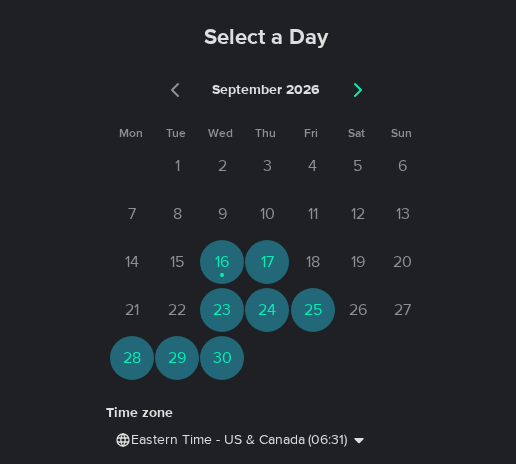
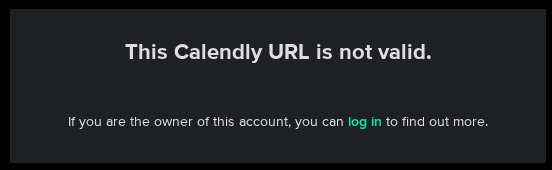
A working booking calendar became a dead link.

  1. Sep 16

    Meeting times visible

    September 16: the booking calendar shows September 2026 with several days available.
  2. Sep 23

    Booking link no longer worked

    September 23: in place of the calendar, the booking widget says: This Calendly URL is not valid.
Same page, same “Book a demo” button, checked a week apart. The exact time of change is unknown. The link was still dead four weeks later.

Where it fits

Your QA and AI agents run checks. BookedDemo keeps the proof current.

Keep both. BookedDemo gives your team, and the AI agents you approve, a maintained source of truth for the buyer Paths that create pipeline.

  • Synthetic monitoring and QA

    Did the steps we scripted pass?

    Strong at repeatable, engineering-owned checks: the journeys you script, from the locations you pick, with pass/fail history. Your team decides what to test and keeps each script current as the Path changes.

  • AI or browser agent

    Can an agent get through this Path right now?

    Strong at flexible runs and investigation: a capable agent can click through a demo Path on its own. What it checks, as which buyer, and what it compares the result with come from the prompt you give it.

  • BookedDemo

    What did each buyer get, and did it change?

    BookedDemo keeps:

    • the Paths that matter, and the buyer profiles that can get something different
    • what each check may do: stop before submit, or submit where you approve it
    • what the buyer saw, and what arrived after submit where approved
    • comparable history: what changed, when it last worked, when it likely started failing
    • reruns after a release or a fix
    • evidence your team and your approved AI agents can both read

Every standard plan works from the buyer’s side, with no CRM access. BookedDemo is not CRM or revenue-stack monitoring and never watches your real leads; Custom can add agreed checks of our own test records inside your systems.

Pricing

Find out whether your own Path does this. Then keep it checked.

Start with one Path. Add buyer-experience and after-submit proof when you need it, and move to Scale when critical Paths need faster change assurance. Monthly prices; buyer profiles, seats, and runs are never billed separately, and Custom is priced by scope. On every plan, you can also use BookedDemo from your own AI agents.

There is no self-serve checkout. We confirm fit, then send a payment link. Compare plans →

What a finding is worth depends on your own funnel. Model your funnel impact →

Start with one Path

Monitor

$49 / month

One Path, checked every day as one approved buyer profile, with the evidence from every run, an email when the Path breaks, degrades, or can’t be checked, 30 days of history, and reruns after a fix.

Start Monitor

Then add proof and assurance

  • Verify: Up to 3 Paths, up to 3 buyer profiles each. Adds UX and calendar findings, buyer-effort history, and approved submissions with checks of what arrives after. $149 / month
  • Scale: Keeps critical Paths trustworthy through change: Safe checks every 4 hours, Change Watch, Launch / Change Verification that you or your approved AI agents can start, Continuous Path Discovery, and Competitor Watch. Up to 5 Paths, up to 5 buyer profiles each, with 12 months of history to compare against. $399 / month
  • Custom: Proof around your own rules and systems: custom coverage, controlled test records, and agreed checks in your CRM or marketing system, such as Salesforce, HubSpot, or Marketo, for those records. Priced by scope

Need a one-off check instead? A Proof Sweep is $750 for one Path in up to 3 buyer profiles.

Before you ask

Scope, runs, and test submissions are covered in the pricing FAQ.

Selected plan Monitor · $49/month

Keep one buyer Path working.

No payment in this form. We confirm fit, then send a payment link. Cancel before the next month.

Change selected plan

Need a single check instead?

What Monitor includes

Monitor is $49 a month: one Path, checked every day as one approved buyer profile. Each run keeps its evidence, an email goes out when the Path breaks, degrades, or can’t be checked, history covers 30 days, and you can rerun after a fix. Safe checks stop before submit.